
Knowledge base architecture is the layered system of information architecture, content models, retrieval pipelines, and governance controls that determines whether people (and now AI agents) can find, trust, and act on organizational knowledge. A working architecture needs at least five layers: taxonomy and navigation, a content model built on documents and chunks, metadata that carries context and permissions, a retrieval layer (search, vector, or graph), and governance that keeps everything current and auditable. This guide covers both traditional human-facing knowledge bases and the newer enterprise requirements for AI-ready systems.
TL;DR:
- A hybrid knowledge base architecture balances federation for live source updates with centralized consistency for AI retrieval, reducing lag and duplication.
- Structuring taxonomy around user questions and tasks improves searchability more effectively than organizational or internal vocabulary categorizations.
- Versioning each document and chunk with specific metadata prevents outdated information from contaminating AI responses and supports auditability.
- Using hybrid retrieval that combines graph traversal and vector search offers better relational and prose accuracy, but at a higher operational cost.
- Governance controls such as content certification, access controls, freshness management, and source traceability are essential for enterprise-grade knowledge bases feeding AI.
Table of Contents
- What Are the Core Components of Knowledge Base Architecture?
- How Should You Structure a Knowledge Base Taxonomy?
- What Content Model Do You Need for Reliable Retrieval?
- RAG, Graphs, or Hybrid: Which Retrieval Architecture Fits?
- How Do Metadata and Navigation Improve Findability?
- What Governance Controls Do Enterprise Knowledge Bases Need?
- What Templates and Review Cycles Keep Content Current?
- How Do You Roll Out a Knowledge Base Architecture in Phases?
- Where Does Conversational Capture Fit in This Architecture?
- Where Most Knowledge Base Projects Actually Go Wrong
- Give Your Knowledge Base a Foundation That Doesn't Rely on Memory
- Sources
- FAQ
What Are the Core Components of Knowledge Base Architecture?
Every durable knowledge base is really a supply chain. Content comes in from somewhere, gets processed into a usable shape, and gets served back out through search or an AI agent. Miss a link in that chain and the whole system degrades, no matter how good your taxonomy looks on a whiteboard.
The canonical layers run roughly like this:
- Connectors pull content from source systems: your CRM, intranet, ticketing platform, Slack, Confluence, Google Drive.
- Source archive preserves the original documents with provenance intact, so you always know where a fact came from.
- Chunk store holds the smaller, retrievable units broken out of longer documents.
- Embedding and index layer turns chunks into vectors for semantic search.
- Graph store (optional but increasingly common) captures relationships between entities, processes, and policies.
- Metadata and catalog layer tracks ownership, versioning, access rules, and freshness.
- Retrieval layer decides what gets served for a given query, whether that query comes from a human or a model.
- UI layer presents results through search, browse, or a conversational interface.
A knowledge base is, at bottom, a federation of structured and unstructured sources, and the architecture's job is to preserve provenance and access distinctions rather than flattening everything into one undifferentiated blob, according to Scality's enterprise knowledge base architecture guide. That single principle should guide a decision many teams get wrong early: whether to federate sources in place or centralize everything into one archive.
Federation makes sense when source systems already have strong access controls and update frequently, since re-syncing content into a central store just adds lag and duplication risk. Centralizing makes sense when you need consistent chunking, embedding, and governance applied uniformly, particularly for AI retrieval. Most mature architectures land on a hybrid: federate for human search across live systems, centralize a curated subset for AI-facing retrieval where consistency matters more than real-time freshness.
How Should You Structure a Knowledge Base Taxonomy?
Structure your top-level categories around what users are trying to do, not around how your org chart is organized. A knowledge base built around internal team names ("Platform Engineering," "Revenue Operations") forces every searcher to first translate their question into your company's internal vocabulary before they can even start looking. Task based or role based categories skip that translation step entirely.
Follow this sequence when building or rebuilding a taxonomy:
- Pull your top questions first. Mine ticket queues, search logs, and support transcripts for the actual language people use, per the structural guidance from HelpDocs.
- Draft a moderate number of top-level categories. More than that and users start guessing which bucket holds their answer; fewer and categories become too broad to be useful.
- Cap nesting at two levels. A third layer of subcategories is usually a sign the taxonomy is doing the job tags should be doing.
- Run a card sort. Give real users your draft category names on cards and watch where they naturally group content, rather than assuming your mental model matches theirs.
- Validate with search-log clustering. Compare what people actually search for against your categories and fix the gaps.
- Layer facets on top. Tags and filters handle cross-cutting topics (a billing question that's also a security question) that a strict hierarchy can't represent well.
Static, top-down hierarchies designed by committee tend to fail in production because they reflect how the organization thinks about its own content, not how a first-time searcher thinks about their problem, a pattern well documented in Yale's usability research on content taxonomy. Task analysis and card sorting aren't optional nice-to-haves here; they're the difference between a taxonomy people actually use and one that just looks tidy in a slide deck.
Pro Tip: Run your card sort twice, six months apart, on the same content set. If the groupings shift meaningfully, your taxonomy is decaying faster than your review cycle catches it.
What Content Model Do You Need for Reliable Retrieval?
Treat every document as a versioned record, not a static file. When a policy changes, you're not editing a page, you're creating a new version with its own timestamp, and the old version stays retrievable for audit purposes even after it's superseded. This single habit prevents the most common failure mode in AI-fed knowledge bases: an agent confidently citing a policy that was replaced eight months ago.
Chunks, the smaller units your retrieval layer actually searches, inherit metadata from their parent document but need their own identity too. According to the Geodocs agent knowledge base specification, each chunk should carry at minimum:
source_uripointing back to the original documentdocument_versionso you know exactly which revision produced this chunkacldefining who or what can retrieve itupdated_atfor freshness calculationsfreshness_window_dayssignaling how long the content stays trustworthy before requiring review- a
deprecatedflag that removes a chunk from retrieval without deleting the underlying record
Chunking strategy should match content type rather than applying one method everywhere. Fixed-length chunking works for short reference snippets like FAQ entries. Semantic chunking, which splits on meaning boundaries rather than character count, suits long-form prose like policy explanations. Hierarchical chunking preserves parent-child structure for specs and technical documentation. Sentence-window chunking, which keeps a few sentences of surrounding context, fits conversational or support-transcript content best.
Standard templates matter more than most teams expect. A consistent title format ("How to [task] in [product]") helps both human scanners and AI retrieval models match queries to the right chunk, because the title itself becomes a strong retrieval signal rather than decoration.
RAG, Graphs, or Hybrid: Which Retrieval Architecture Fits?
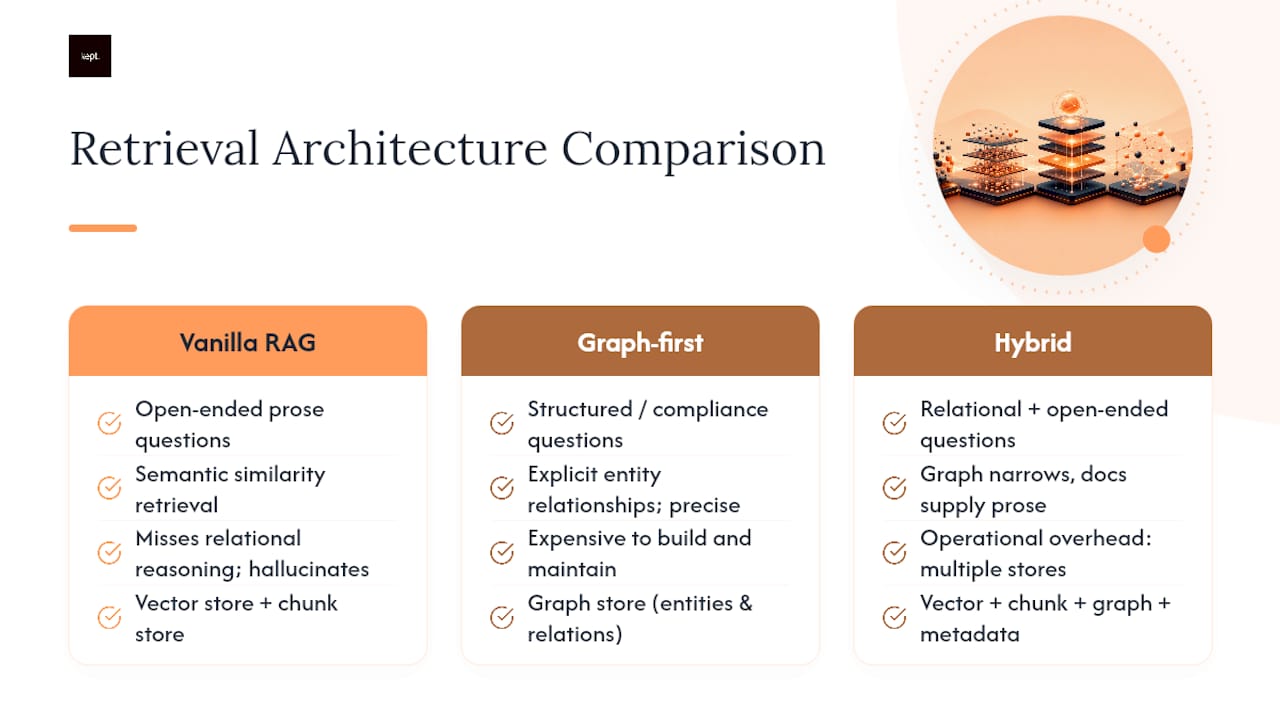
Hybrid retrieval, combining graph traversal with document retrieval, is the pattern most enterprises land on after their first pure RAG deployment runs into relational questions it can't answer well, according to the Scality architecture guide. Understanding why requires looking at where each approach breaks down on its own.
Vanilla RAG (retrieval-augmented generation) embeds your chunks into a vector store, then retrieves the most semantically similar chunks for a given query and hands them to a language model to synthesize an answer. It works well for open-ended, prose-heavy questions: "How do I request a refund?" It fails on relational questions: "Which of our vendors in the EU are subject to both GDPR and our internal data-residency policy?" Vector similarity alone doesn't reason about entity relationships, so RAG systems asked relational questions tend to hallucinate connections that don't exist or miss ones that do.
Graph-first retrieval stores entities (people, policies, products, vendors) and their relationships explicitly, then traverses those relationships to answer structured or compliance-oriented questions. It's precise on the questions RAG struggles with, but graphs are expensive to build and maintain, and they're a poor fit for open-ended prose questions where the answer isn't really about relationships at all.
Hybrid retrieval uses graph traversal first to narrow the search space to the relevant entities, then pulls document chunks tied to those entities to supply the actual prose a model needs to generate a natural answer. Most production-grade knowledge bases converge on this pattern because it balances the relational accuracy graphs provide with the language coverage document retrieval supplies, a finding consistent across recent enterprise KB implementations.
The storage implications are real. You're now maintaining a vector database for embeddings, a chunk store for retrievable text, a graph store for relationships, and a metadata layer tying it all together. Plan for that operational overhead before you commit to hybrid, not after.
How Do Metadata and Navigation Improve Findability?
Metadata does double duty in a modern knowledge base: it powers filters for human searchers and it supplies context an AI model needs before it ever generates a word. The dimensions that matter most are role (who this content is for), product or feature area, intent (troubleshooting versus how-to versus policy), owner, and status (current, under review, deprecated).
Metadata-driven retrieval is often more reliable than vector search alone, because enriching chunks with access controls, version, source, and freshness lets you filter candidates before a model ever processes them, which cuts down on both irrelevant results and inadvertent data exposure. That pre-filtering step is one of the more underrated architecture decisions teams make.
A few tuning practices consistently pay off:
- Maintain a synonym list so "cancel subscription" and "end my plan" route to the same content.
- Boost exact phrase matches over loose keyword overlap for high-intent queries.
- Close the loop between search analytics and content gaps: if a query returns nothing useful three weeks running, that's a missing article, not a search bug.
- Use hub pages and breadcrumbs so browsers, not just searchers, can orient themselves.
- Surface tag-driven "related articles" panels to catch adjacent questions before someone opens a ticket.
Pro Tip: Pull your zero-result search queries weekly for the first quarter after launch. That single report will tell you more about taxonomy gaps than any planning session.
What Governance Controls Do Enterprise Knowledge Bases Need?
An enterprise-grade knowledge base, especially one feeding an AI agent, needs five governance capabilities that a simple internal wiki doesn't: data certification, ACL-aware retrieval, freshness governance, compliance auditability, and organizational accountability, according to Atlan's enterprise LLM knowledge base guide. Skip any one of these and you've built a system that will eventually surface stale, unauthorized, or unattributed information with total confidence, which is worse than surfacing nothing.
Here's how those five requirements translate into practice:
- Data certification means content carries an explicit status (certified, draft, deprecated) that retrieval respects, not just a publish date.
- ACL-aware retrieval filters results by the requester's permissions before content ever reaches a model or a search results page.
- Freshness governance attaches review cadences and expiration windows to content based on how fast it decays.
- Compliance auditability requires that every answer can be traced back to its source with a timestamp and version number.
- Organizational accountability assigns a named owner to every content category, so "who approved this" has an answer.
Every AI-generated response should carry an audit trail: the release tag it was generated against, the specific chunk IDs retrieved, the document versions those chunks came from, and full provenance back to the source system. Treat the enterprise knowledge base as governed data infrastructure rather than a content project; the controls above are governance artifacts that belong inside the retrieval pipeline, not front-end gates bolted on afterward.
A practical ownership split works well here: your data team owns the substrate (source systems, ACLs, metadata schema, certification status), while your AI or platform team owns the retrieval pipeline built on top of it. Trying to make one team own both ends up creating bottlenecks in whichever discipline that team lacks.
What Templates and Review Cycles Keep Content Current?
A consistent article template does more for long-term maintainability than almost any other single decision. At minimum, each article needs: a title following your naming convention, a one-line summary, numbered steps where applicable, a worked example, a named owner, a product or feature tag, and a last-reviewed date.
Review cadence should match volatility, not a single company-wide schedule:
- Operational content (status pages, incident procedures) needs review on a near-daily cadence, since it changes with the systems it describes.
- Reference content (how a feature works) holds up well on a quarterly review cycle.
- Policy content (compliance, legal, HR) needs annual review at minimum, tied to whatever regulatory calendar governs it.
Archiving and version control matter as much as authoring. Soft-deprecate content with a redirect rather than deleting it outright, so old links don't dead-end. For AI-facing content specifically, pin agents to immutable release tags, snapshots of documents, chunks, and embeddings, so a bad ingest can be rolled back cleanly instead of forcing a scramble through live data, a practice detailed in the Geodocs agent knowledge base spec. Re-embedding after a model upgrade should always produce a new release tag rather than quietly mixing old and new embeddings in the same index.
How Do You Roll Out a Knowledge Base Architecture in Phases?
Trying to build the full architecture in one push is how most knowledge base projects stall. A phased rollout gets you to something usable fast, then layers in governance and AI readiness once the foundation holds.
- Phase 0, audit. Inventory existing content, pull six months of search logs and ticket data, and identify your top 10 to 20 highest-traffic articles as your pilot set.
- Phase 1, foundation. Build the taxonomy, write your article templates, and set a governance baseline: ownership, review cadence, certification status.
- Phase 2, technical build. Wire up connectors, apply chunking rules by content type, and stand up your vector index.
- Phase 3, governance automation. Add ACL-aware retrieval, release tagging, and full auditability so every AI-generated answer can be traced back to source.
Measure the pilot against a small set of KPIs before scaling further: deflection rate (tickets avoided because self-service worked), time to resolution, retrieval precision (are the right chunks actually being surfaced), and citation traceability (can every AI answer point back to a specific document version). If those four numbers don't move in the pilot, don't scale the architecture, fix the pilot first.
Where Does Conversational Capture Fit in This Architecture?
Every layer described above assumes the knowledge already exists somewhere in written form. In practice, a lot of it doesn't. It lives in a senior employee's head as judgment calls, exceptions, and reasoning that never made it into a document, which is exactly the gap conversational capture is built to close.
Kept lets employees describe their processes in their own words through guided conversation, then structures that input into documented workflows, capturing the reasoning and exceptions a static SOP usually leaves out. That output feeds naturally into the content model described earlier: each captured workflow becomes a versioned document, gets chunked, and carries the same metadata (owner, product tag, freshness window) as any other source. Business workspaces add access controls and review steps before content is certified into the broader knowledge base, which keeps captured knowledge inside the same governance loop as everything else, rather than sitting off to the side as an ungoverned transcript.
Where Most Knowledge Base Projects Actually Go Wrong
Precision and simplicity pull in opposite directions, and most teams pick wrong more often than they'd admit. A finely faceted, deeply governed architecture is the right call for a regulated enterprise KB feeding compliance answers to an AI agent. That same complexity, applied to a 40-person startup's internal wiki, just guarantees nobody maintains it past month three. Match the architecture's rigor to the actual stakes of getting an answer wrong, not to what looks impressive in a planning document.
The adoption failures I keep seeing trace back to three root causes: a taxonomy built from an org chart instead of user language, content with no named owner so nobody notices when it goes stale, and a launch that skips validation entirely because card sorting feels like an extra step rather than the actual foundation. When you skip validation, you find out about the mismatch six months later, buried in support tickets asking questions your taxonomy never anticipated.
Pro Tip: Before you build a single category, spend a week just reading your last 200 support tickets. The vocabulary problem reveals itself faster there than in any workshop.
— Anthony
Give Your Knowledge Base a Foundation That Doesn't Rely on Memory
The hardest content to architect for is the kind nobody wrote down, the exceptions a veteran employee handles by instinct and the reasoning behind a judgment call that never made it into an SOP. Kept is built specifically for that gap: instead of asking someone to write documentation from scratch, it captures their process through guided conversation and structures it into a workflow your knowledge base can actually govern, version, and retrieve.
For an organization building out formal architecture, that means fewer blind spots at the source: less tribal knowledge walking out the door, faster onboarding because new hires inherit context instead of just steps, and a documentation pipeline that doesn't depend on someone finding time to write. Individual professionals get the same benefit for their own expertise through kept for you, while teams get shared workspaces with access controls through kept for business. Both plans are detailed on the Kept pricing page, where you can see which fits your situation and start capturing the knowledge your architecture is currently missing.
Sources
For governance-focused design, Atlan's enterprise LLM knowledge base guide covers the five capabilities that separate consumer tools from enterprise-ready systems. For technical chunking and versioning detail, see the Geodocs agent knowledge base specification. For foundational taxonomy practice, HelpDocs' structural guidance walks through category design from first principles.
- Enterprise LLM Knowledge Base: Architecture and Governance Guide
- Geodocs
- How to structure a knowledge base | HelpDocs Learn
- Enterprise Knowledge Base for AI: Architecture Guide
- Content taxonomy and labeling — Yale Usability Lab
FAQ
What Is the Structure of a Knowledge Base?
A knowledge base's structure has two visible layers, taxonomy (categories and navigation) and content (articles, documents, and chunks), sitting on top of invisible layers for metadata, search indexing, and governance. The taxonomy should reflect user tasks and language rather than internal team structure, per HelpDocs' guidance.
What Is an Example of a Knowledge Management System?
A knowledge management system spans anything from a simple internal wiki to an enterprise platform combining a content archive, search index, and AI retrieval layer. Kept is one example on the capture side: it turns spoken process explanations into structured, governed documentation that feeds into a broader knowledge management system.
Can You Explain the Architecture of a Knowledge-Based System?
A knowledge-based system architecture typically layers connectors, a content or source archive, a chunk and embedding store, an optional graph store for relationships, a metadata catalog, and a retrieval layer that serves answers to humans or AI agents. Enterprise versions add governance controls: certification, access-aware retrieval, freshness tracking, and auditability, as outlined in Atlan's governance framework.
What Is Knowledge-Based Design?
Knowledge-based design refers to structuring information so it can be reliably retrieved and reasoned over, whether by a human searcher or an AI model. It combines information architecture principles (taxonomy, navigation, findability) with data engineering practices (chunking, metadata, versioning) to make organizational knowledge both usable and trustworthy.
How Much Does Kept Cost?
Kept offers two plans, kept for you for individual professionals and kept for business for teams with shared workspaces and access controls. Current pricing for both is available on the Kept pricing page.