
Yes, AI can produce usable SOP drafts in minutes, but only when you feed it a real execution instead of a blank page. Start by recording a single exemplar of the process you want documented, whether that's a screen capture, a voice walkthrough, or a set of annotated notes. The draft that comes back will still need a human who knows the work to check it before anyone treats it as gospel.
TL;DR:
- AI can quickly generate SOP drafts only when provided with real, detailed process recordings, and human review remains essential before publication.
- Capture methods include screen recordings, voice walkthroughs, or annotated notes, which must be clear and contextual to produce accurate drafts.
- Structuring the process using templates and RAG grounding ensures the AI stays aligned with source documents and maintains consistency across procedures.
- Governance controls, such as scope definition, audit trails, and objective testing, are crucial to prevent trusting AI-generated SOPs with critical or safety-related processes.
- Running pilots on low-risk, repeatable processes allows validation of the workflow's speed and accuracy before scaling to high-risk or regulated procedures.
Table of Contents
- How AI for SOPs Turns a Walkthrough Into a Procedure
- A Step-by-Step Workflow for a Reliable AI-Generated SOP
- Governance and Accuracy Controls That Keep SOPs Trustworthy
- When to Automate a SOP and When to Slow Down
- How Kept Applies Governed Capture to Everyday SOPs
- What I'd Actually Do Before Trusting AI With a Real SOP
- Try Kept as Your First AI-Assisted SOP Pilot
- Sources
- FAQ
How AI for SOPs Turns a Walkthrough Into a Procedure
Most tools built for AI process documentation follow the same four moves: capture, transcribe, structure, refine. The capture step is where the real knowledge enters the system, and it usually happens one of three ways.
- Screen step-capture: a browser extension or desktop app records clicks, keystrokes, and screen states while someone performs the task.
- Voice walkthroughs: the person narrates what they're doing and why, which is often the only way to catch a judgment call a screenshot would never show.
- Manual notes: existing documents, tickets, or chat threads get fed in as raw material when a live capture isn't practical.
Once you have raw input, transcription and optical character recognition convert it into text the model can work with. That's the unglamorous part nobody talks about, but it's where a lot of quality gets won or lost. A muddy recording or a screenshot with no context produces a muddy draft, no matter how good the model is downstream.
From there, a large language model paired with a structured template turns loose narration into numbered steps, decision points, and exception handling. This is where retrieval-augmented generation, sometimes called RAG, earns its keep. Instead of letting the model invent plausible-sounding steps from general training data, RAG grounds the output in your own source documents, past tickets, or compliance text. Prompt templates and light tool orchestration then keep the output format consistent across every SOP your team generates, so the fiftieth procedure reads like the first one instead of drifting into a different voice.
A Step-by-Step Workflow for a Reliable AI-Generated SOP
Treat your first SOP like a pilot, not a rollout, following practical advice on how to roll out AI in an engineering firm without creating shelf-ware by Yesper. The workflow below scales from one procedure to fifty once you trust it.
- Define the outcome and scope. Pick a single process, state what "done correctly" looks like, and resist the urge to document three related tasks at once.
- Capture a real execution. Record the screen, walk through it out loud, or annotate a working document while someone actually performs the task, not while they describe it from memory.
- Transcribe and preprocess. Convert the capture to text, then break it into chunks around natural task boundaries. Flag every decision point and exception explicitly. Preprocessing the input this way, rather than dumping a raw transcript into a prompt, is what keeps the model from losing track of critical context.
- Generate the draft. Use a consistent prompt template and lean on RAG whenever a step depends on facts you already have documented, like a compliance threshold or a system field name, rather than letting the model guess.
- Run structured human review. A subject-matter expert checks accuracy, a compliance reviewer checks scope where relevant, and someone actually performs a test run against the draft before it goes live.
- Publish with version control. Lock the approved version, assign it as training for the relevant team, and set a review date so the SOP doesn't quietly go stale.
Pro Tip: Chunk anything longer than a single-page procedure before you generate a draft. IBM's research on document fidelity found that repeated LLM edits can degrade a document over successive passes, so feeding the model one clean, well-scoped section at a time beats asking it to rewrite an entire 12-step process in one shot.
Governance and Accuracy Controls That Keep SOPs Trustworthy
The fastest way to lose trust in AI-generated procedures is to publish one with a confidently wrong step baked in. Governance isn't bureaucracy here; it's the thing that lets you actually use the speed AI gives you without inheriting its blind spots.
Start with scope. Decide, in writing, which processes are approved for AI-assisted drafting and which aren't. NIST's AI Risk Management Framework organizes this kind of work into four functions, GOVERN, MAP, MEASURE, and MANAGE, and it maps almost too neatly onto SOP adoption: govern sets your policy, map defines where AI touches your procedures, measure tracks reviewer outcomes and model fidelity, and manage handles updates as processes drift.
A few controls do most of the work:
- Use RAG and citation-backed outputs anywhere a step states a fact, a threshold, or a system-specific detail.
- Keep an audit trail of every edit and approval, not just the final published version.
- Chunk long procedures before generation to avoid the context degradation that comes with asking one model call to hold too much at once.
- Define acceptance tests and objective evidence, a real test run, not just a reviewer's signature, before marking any SOP approved.
That last point echoes something ISO's process-approach guidance gets right: the extent of documentation should match your organization's actual complexity, not a generic template. A five-step onboarding task doesn't need the same documentation weight as a regulated safety procedure.
None of this works if human review becomes a rubber stamp. Give reviewers actual authority to reject or rewrite a draft, and measure the quality of their judgment rather than how many SOPs they clear per hour. IBM's research on reducing AI misinformation exposure points to the same mix: data quality, RAG, smaller domain-tuned models where possible, and a human checkpoint that's actually empowered to say no.
When to Automate a SOP and When to Slow Down
Not every procedure deserves the same treatment. The judgment call is where risk lives, and it's worth tiering before you write a single prompt.
- Good fits: repeatable software workflows, onboarding checklists, routine admin tasks, and general knowledge capture for training materials.
- Avoid or govern heavily: regulated procedures, safety-critical steps, and anything with real liability exposure, unless a formal compliance review sits in the loop before publication.
- Build a simple approval matrix: low-risk SOPs get a single reviewer and fast turnaround; high-risk ones require a named compliance owner and a documented test run.
- Track pilot metrics that mean something: time saved from draft to publish, reduction in new-hire ramp time, and error rates once the SOP is live.
How Kept Applies Governed Capture to Everyday SOPs
Kept's conversational AI approach starts from the same principle this guide has pushed all along: the how of a decision matters as much as the what. Instead of forcing someone to fill out a template, Kept lets employees explain their process in their own words through guided interaction, capturing exceptions and reasoning that a checklist would flatten out.
- Guided conversations preserve context and judgment calls, not just the sequence of steps.
- Workspace-level access controls and opt-in capture let teams decide what gets recorded, reviewed, and kept.
- Review flows, audit history, and training assignment map directly onto the governance habits already covered here.
For teams evaluating a pilot, the business workspace overview and the trust center are the places to start comparing scope and controls before rolling anything out further.
What I'd Actually Do Before Trusting AI With a Real SOP
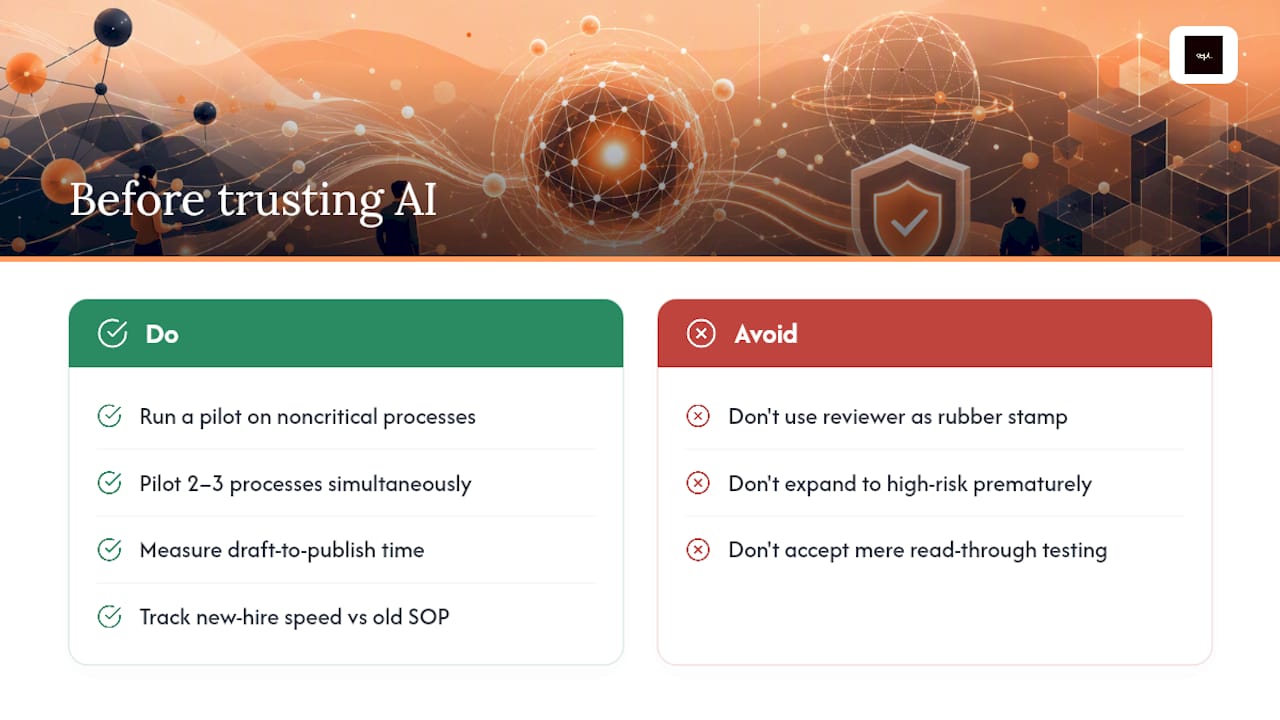
Run your first pilot on something that won't hurt anyone if it's slightly wrong. Pick two or three noncritical processes, measure the time from draft to publish, and track how much faster a new hire gets up to speed using the AI-generated version versus the old document.
Build the reviewer workflow before you build the SOP library. If review is a rubber stamp, you've automated the wrong part of the job. Keep a visible change log and a revalidation date on every procedure, and only expand into higher-risk SOPs once the low-risk tier has proven it holds up under an actual test run, not just a read-through.
— Anthony
Try Kept as Your First AI-Assisted SOP Pilot
Some AI-driven tools skip the blank-template problem entirely by letting users talk through the process and turning that conversation into a structured, reviewable draft that keeps the reasoning most SOPs lose.
A reasonable first pilot looks like this: capture five real procedures over 30 to 60 days, have the relevant subject-matter experts validate each draft, and track how much onboarding time drops for the next new hire assigned to that work. Workspace controls mean your team decides what gets captured and who can see it, and version history gives you the audit trail governance teams ask for. If your organization is weighing seat-based access for a whole team, the Kept for Business page lays out how workspaces and review flows work at that scale. Ready to see where your own SOP backlog fits? Check current plans and pricing and set up a pilot around the processes your team already knows how to do, they just haven't written down yet.
Sources
- Artificial Intelligence Risk Management Framework (AI RMF 1.0) — NIST
- Concept and use of the process approach for management systems — ISO
- AI misinformation: Here's how to reduce your company’s exposure and risk — IBM
FAQ
Which AI Is Best for Writing SOPs?
There's no single best AI for every SOP, since the right choice depends on whether you need general-purpose drafting, RAG-grounded accuracy, or conversational capture that preserves decision context. Tools built specifically for AI process documentation, like Kept's guided-interaction approach, tend to outperform generic chatbots when the goal is capturing exceptions and reasoning rather than just formatting a list of steps.
Can ChatGPT Create SOPs?
ChatGPT can draft a readable SOP structure if you give it a clear transcript or notes to work from, but it has no built-in way to verify facts against your actual systems unless you pair it with retrieval-augmented generation. Treat any ChatGPT-generated draft as a starting point that still needs subject-matter review before publication.
Can I Use AI for My Company's SOPs?
Yes, AI is well suited to drafting SOPs for repeatable software tasks, onboarding steps, and routine admin work, provided a human reviewer validates the draft before it goes live. For regulated or safety-critical procedures, keep AI drafting in the loop but add a formal compliance review as a hard gate before publication.
Is There an AI Tool Built Specifically for Creating SOPs?
Yes, purpose-built tools exist for AI SOP writing, and they generally outperform general chatbots because they're designed around capture, structured review, and version control rather than one-off text generation. Kept, for instance, is built around conversational capture and guided interaction so the resulting SOP keeps the reasoning behind each step, not just the sequence.