
AI for onboarding works by handling admin, personalizing each new hire's path, and answering policy questions around the clock, freeing HR to focus on the human parts of the job. The fastest way to prove it: pilot a single AI tool on one or two roles for two to six weeks, then track Day-1 readiness and completion rates before scaling further.
TL;DR:
- Most onboarding AI tools should be integrated directly with existing HR systems to avoid data drift and ensure accuracy.
- Key success metrics include Day-1 readiness, task completion rates by day 30, and early attrition, which directly indicate pilot effectiveness.
- Using conversational AI with retrieval-augmented generation helps answer policy questions accurately by grounding responses in up-to-date organizational documents.
- A focused pilot on one or two roles for up to six weeks allows identification of integration issues and prevents scope creep.
- Before purchase, confirm vendors provide gated write actions, an audit trail, and adhere to data privacy standards to maintain operational and security trust.
Table of Contents
- Where AI for Onboarding Delivers the Most Value
- How AI Powers Onboarding: LLMs, RAG, Agents, and Automation
- How to Pilot AI Onboarding in Six Weeks or Less
- What to Require Before You Buy or Build
- How Kept Applies Conversational AI to Onboarding
- Data Privacy and Security in AI-Powered Onboarding
- Getting HR Teams Ready to Adopt AI Onboarding Tools
- Practical Perspective: Common Pitfalls and How to Avoid Them
- Try Kept for Your Next Onboarding Pilot
- Sources
- FAQ
Where AI for Onboarding Delivers the Most Value
Most onboarding programs fail in the same predictable spots: new hires wait days for equipment, managers forget to send forms, and nobody documented why the exception process for remote hires works differently than the handbook says. AI attacks all three problems at once, and the return shows up faster than most HR leaders expect.
The clearest wins cluster around four use cases:
- Personalized learning paths. A checklist for a sales rep in Chicago should not look like one for a warehouse lead in Phoenix. AI-driven onboarding solutions generate role- and location-specific task lists instead of one generic PDF for everyone.
- 24/7 policy and benefits support. New hires ask the same questions on nights and weekends when HR is offline. An AI onboarding assistant answers them instantly instead of making someone wait until Monday.
- Automated task orchestration. Provisioning laptops, triggering e-signatures, and nudging managers who forgot to approve access requests are exactly the kind of repetitive coordination that generative AI and intelligent automation handle well through real-time Q&A, proactive reminders, and orchestrated task flows.
- A virtual buddy for status and nudges. Some platforms surface progress dashboards and automatically remind whoever is holding up a step, cutting down on the manual chasing that eats a coordinator's week, a pattern several AI onboarding assistant vendors now build around.
Pro Tip: Don't measure success by how many features you turned on. Track three numbers: Day-1 readiness (did the person have equipment, access, and a schedule on their first morning?), completion rate on required tasks by day 30, and whether early attrition in the first 90 days moved at all. Those three tell you if the pilot is working.
Day-1 readiness deserves special attention because it's the leading indicator most teams ignore. Onboarding agents that pull equipment status, document completion, and first-day schedules into a single view catch the gaps that used to surface as a frustrated new hire standing at an empty desk, a use case onboarding agent platforms are built specifically to solve.
How AI Powers Onboarding: LLMs, RAG, Agents, and Automation
Ask three vendors "how does your AI onboarding work" and you'll get three different answers, but they usually break down into four underlying techniques. Knowing which is which helps you ask better questions in a demo.
- Large language models (LLMs) handle the conversational layer: understanding a new hire's question phrased in plain language and generating a clear answer or a tailored piece of content, like a welcome message customized to someone's department.
- Retrieval-augmented generation (RAG) grounds those answers in your actual policies instead of the model's general training data. Oracle's Onboarding Assistant is a useful reference point here: it uses LLMs plus RAG to answer questions based on the organization's own policy documents, with deep links straight into the relevant onboarding task.
- Agent patterns govern what the AI is allowed to do, not just say. The safest and most common design keeps the agent read-only for most functions (checking status, pulling documents, confirming schedules) and gates any actual write, like marking a task complete, behind an explicit confirmation step.
- Intelligent automation stitches the rest together: triggering the equipment order, routing the e-signature, pinging a manager three days before a deadline.
The mistake HR teams make is assuming one vendor gives you all four in a single well-integrated package. Some tools are strong on conversational Q&A but weak on automation; others orchestrate tasks well but can't answer a nuanced benefits question. Map your actual pain points to these four techniques before you shop, not after.
How to Pilot AI Onboarding in Six Weeks or Less
A pilot that tries to fix everything at once usually collapses under its own scope. The teams that succeed follow a tighter sequence, and it typically breaks into four stages.
- Map the journey and define success metrics first. Before touching any tool, write down what "good" looks like: Day-1 readiness, completion rate by day 30, time-to-productivity. Without these numbers up front, you'll have no way to prove the pilot worked.
- Scope your RAG sources. Identify the authoritative documents the AI should draw from: your HRIS records, the policy library, the training catalog. This is the step teams skip, and it's the one that determines whether the assistant gives correct answers or confidently wrong ones.
- Decide native integration versus a bolt-on tool. An assistant that reads directly from your HRIS or Onboarding Hub avoids creating a second, competing version of the truth. A bolt-on tool that syncs periodically will drift, and drift is where trust in the tool erodes fastest.
- Run the pilot on one or two roles for two to six weeks. Practitioner guidance consistently points toward starting small rather than a company-wide rollout, and for good reason: a focused pilot surfaces integration gaps and confusing agent responses while the stakes are still low.
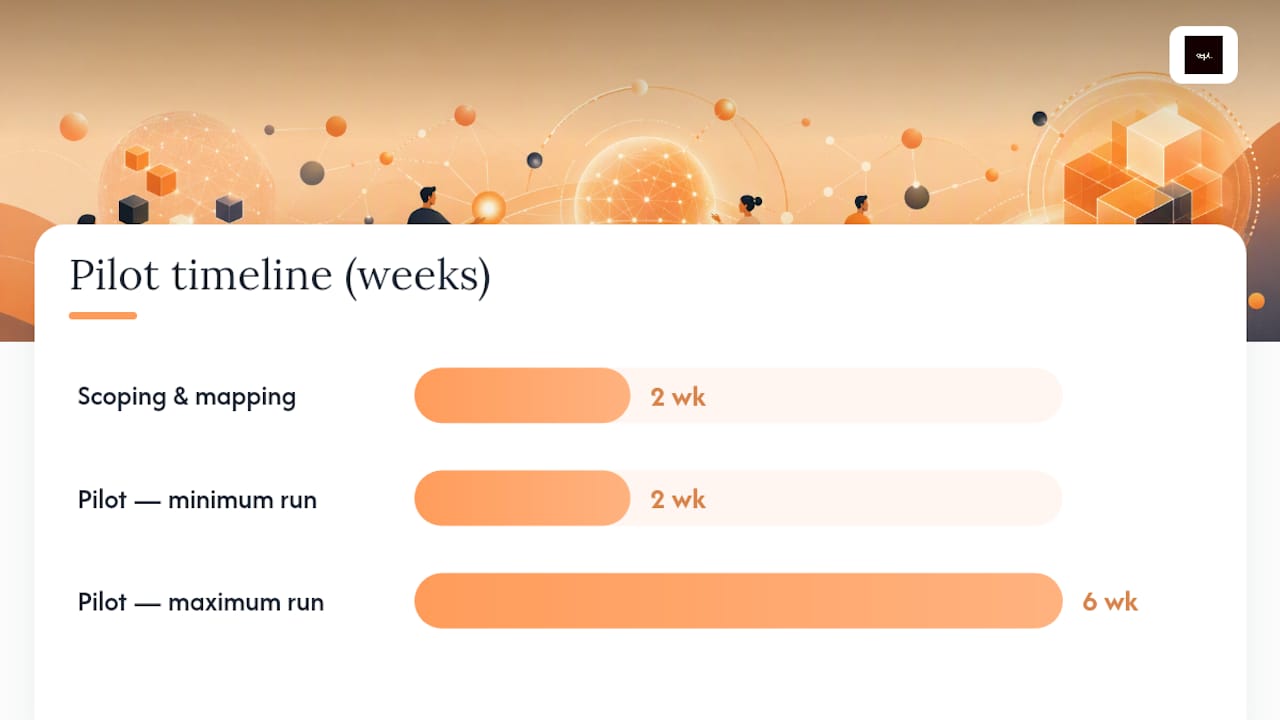
Pro Tip: Budget roughly two weeks for scoping and mapping before the pilot even starts, then plan for two to six weeks of live monitoring. The timeline compresses when the agent reads your existing onboarding records directly and stretches out considerably if you're building a separate data pipeline just to feed it.
Resist the urge to add a second or third role mid-pilot because the first one is going well. The value of staying narrow is that you can attribute changes in your metrics to the tool itself, not to seasonal hiring patterns or an unrelated policy change that happened to land the same month.
What to Require Before You Buy or Build
Not every AI onboarding tool that looks polished in a demo will hold up in production. Before signing anything, HR should run the project against a short checklist that separates real integration from a nice interface bolted onto nothing.
- Single source of truth. The assistant should read from your HRIS or Onboarding Hub directly, not a separately maintained data set that quietly falls out of sync within a quarter.
- Permissioned reads and gated writes. The agent should be able to check status freely but require explicit confirmation before it changes a record, marks a task complete, or sends anything on a new hire's behalf.
- A visible audit trail. Every write action the agent takes needs a timestamp and a record of what triggered it, so you can trace back any error to its source.
- Data governance on the RAG layer. Ask exactly which documents feed the assistant's answers, how often they're refreshed, and whether capture is opt-in with a review and deletion path.
- Reporting on the metrics that matter. Day-1 readiness, completion rates, and time-to-productivity should be visible in a dashboard, not something you have to reconstruct manually every month.
| Checklist item | Why it matters | Red flag to watch for |
|---|---|---|
| Native HRIS integration | Prevents a second, drifting data store | Vendor requires a separate onboarding database |
| Gated write actions | Limits damage from a wrong or hallucinated answer | Agent can update records with no confirmation step |
| Audit trail on writes | Lets you trace errors back to their cause | No log of what the agent changed or when |
| Day-1 readiness reporting | Gives you a leading indicator, not just a lagging one | Dashboard only shows completion after the fact |
Vendors that hesitate on the gated-writes question, or treat it as a minor detail, are telling you something about how the rest of the product was built.
How Kept Applies Conversational AI to Onboarding
Most onboarding failures aren't about missing checklists. They're about missing context: the exception nobody wrote down, the workaround a departing employee never explained to their replacement. Kept was built around that specific gap.
Instead of asking a subject-matter expert to write a formal process document (something almost nobody does well or willingly), Kept captures workflows through guided conversation. An employee describes how they actually do the work, in their own words, including the exceptions and the reasoning behind them, and Kept converts that into a structured workflow a new hire can search later.
That maps directly onto the RAG problem covered above. A retrieval-augmented onboarding assistant is only as good as the documents feeding it, and most companies don't have clean, current process documentation sitting around waiting to be indexed. Kept generates that documentation as a byproduct of normal conversation, which is a more realistic path than asking every team lead to write a manual nobody will read.
For HR and people teams specifically, Kept offers:
- Workspace-level access controls, so sensitive process knowledge stays scoped to the right team
- Context-aware search that surfaces the reasoning behind a rule, not just the rule itself
- Guided interviews built for capturing tacit, "how we actually handle it" knowledge that traditional SOPs miss
You can see how this plays out for specific teams in the HR and people team demos, or watch how an engineering manager uses the same capture process to onboard a new hire from what the team already knows rather than a stale wiki page.
Data Privacy and Security in AI-Powered Onboarding
New-hire onboarding touches some of the most sensitive data a company holds: Social Security numbers, bank details, background check results, sometimes immigration status. Any AI layered on top of that process inherits the responsibility to protect it.
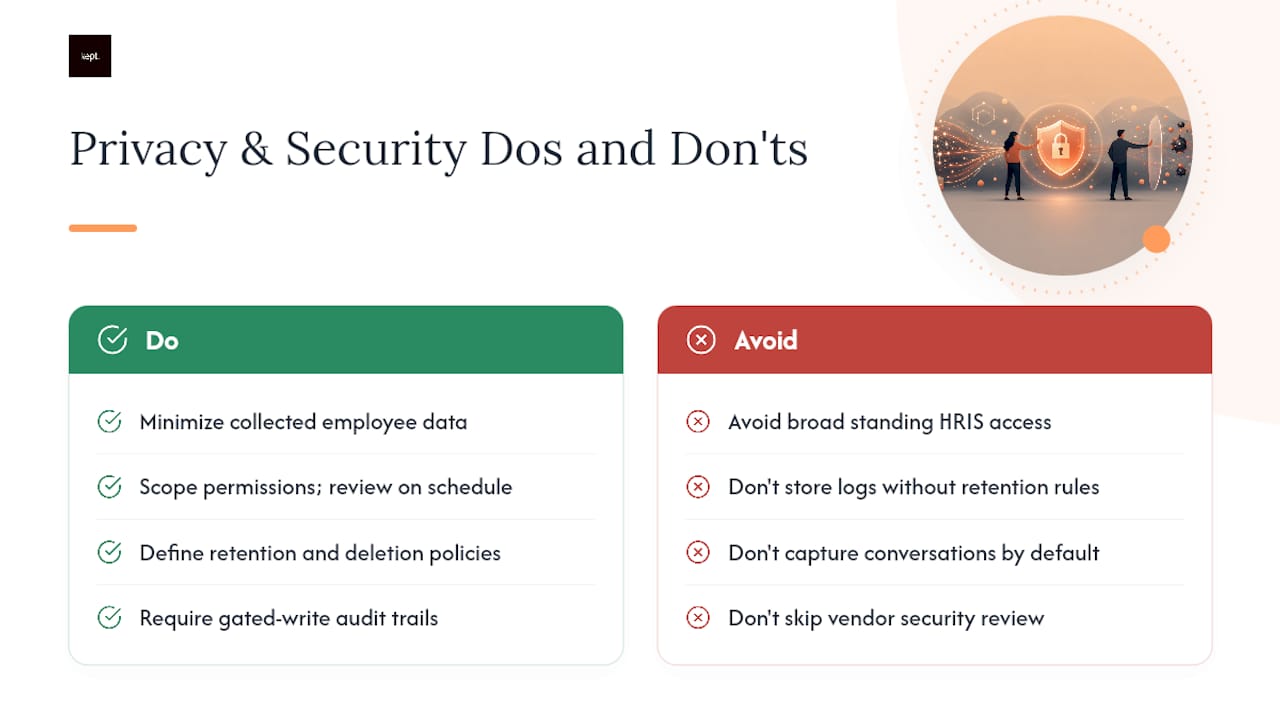
Start with data minimization. The assistant needs enough access to answer policy questions and check task status, not standing access to every field in the HRIS. Scope permissions narrowly and review them on a schedule, not just at initial setup.
Retention policy matters just as much as access control. Know how long conversation logs, captured process descriptions, and RAG source documents are stored, and whether new hires or employees can request deletion. Opt-in capture, where an employee explicitly consents before a conversation is recorded or used to build documentation, should be table stakes rather than a premium feature.
Finally, insist on an audit trail for every write action, not just a general activity log. If the agent marks a task complete or updates a record, you need to know exactly when, why, and whether a human confirmed it. This is the same gated-write principle covered in the evaluation checklist above, and it applies just as strongly to data security as it does to operational accuracy. A vendor's security documentation is worth reading closely before you commit any employee data to a new tool.
Getting HR Teams Ready to Adopt AI Onboarding Tools
The biggest obstacle to a successful AI onboarding rollout usually isn't the technology. It's the HR coordinator who has run the same manual checklist for six years and doesn't trust a chatbot to get it right.
Bring that person into the pilot design early, not after the tool is already selected. People who've owned a broken process for years often know exactly where it breaks, and that knowledge is more valuable than any vendor's feature list.
Training needs to cover two different audiences with two different concerns. HR staff need to understand what the AI can and cannot do, especially where its write permissions stop and a human has to step in. New hires and hiring managers need a much lighter touch: a short explanation of what the assistant is for and how to escalate when it doesn't have an answer.
Set expectations that the first few weeks will surface gaps in your documentation, not just in the tool. If the assistant gives a vague answer about a benefits exception, that's often a sign the underlying policy was never written down clearly in the first place, not a failure of the AI itself. Treat those moments as free audits of your own process documentation rather than reasons to abandon the pilot.
Practical Perspective: Common Pitfalls and How to Avoid Them
The failure pattern I see most often isn't the AI giving a wrong answer. It's teams building a second data store that quietly drifts from the real HRIS, so the assistant ends up confidently wrong instead of usefully uncertain. Read from your system of record. Don't build a shadow copy of it.
The second pattern is trusting the agent with unsupervised writes too early. Require explicit confirmation for anything that changes a record, at least through the first few months of production use.
Start with the highest-friction task in your current process, not the easiest one to automate. That's where the ROI shows up fastest. And don't underinvest in manager and IT enablement. A polished new-hire experience backed by a manager who never got trained on the tool is how pilots quietly die in month two.
— Anthony
Try Kept for Your Next Onboarding Pilot
Kept is built for exactly the gap this article keeps circling back to: the documentation that never gets written because writing a formal SOP is nobody's favorite task. Instead of asking a manager to draft a manual, Kept turns a guided conversation into a structured, searchable workflow, capturing the exceptions and reasoning that a generic checklist always misses.
That's the foundation a RAG-backed onboarding assistant actually needs: current, context-rich process knowledge instead of a stale wiki nobody updated since last year. Kept for Business gives teams workspace-level controls and shared access so that knowledge stays with the organization even when the person who knows it best moves on, and Kept for You works the same way for individual professionals documenting their own expertise. If you're scoping a pilot along the lines described above, check current plans and pricing and see whether a small integrated pilot fits your first two roles.
Sources
For deeper technical grounding, see IBM's overview of onboarding automation, Oracle's documentation on AI-assisted onboarding, and this practitioner guide to automating employee onboarding with AI. For a broader look at tool categories, see this AI tools overview.
FAQ
How Can AI Be Used in Employee Onboarding?
AI personalizes checklists by role and location, answers policy and benefits questions around the clock through a conversational assistant, and automates task orchestration like equipment provisioning, e-signatures, and manager reminders.
What Are the 5 C's of New Hire Onboarding?
Definitions of the "C's" vary across sources, and no single version is universally standard; most versions cover elements like compliance, clarification of role expectations, culture, connection with colleagues, and check-ins over the first months.
Which Type of AI Is Most Used for Onboarding?
Conversational AI built on large language models, combined with retrieval-augmented generation to ground answers in company-specific policy documents, is the dominant pattern in current onboarding assistants.
Which AI Tool Is Best for HR Onboarding?
The right tool depends on whether your priority is task automation, policy Q&A, or capturing process knowledge that traditional documentation misses. Kept focuses on that last gap, turning conversational capture into structured, searchable onboarding content, and current plan details are available on Kept's pricing page.